Kyrex bot avatar
๐Ÿ›ก๏ธ Moderation Bot

Moderation made simple.

Kyrex is a clean, slash-command-only Discord bot. Kick, ban, timeout, warn, log, welcome, announce, and even OSINT scan โ€” all with beautiful embeds.

Latest Updates

New features and improvements as they ship.

Kyrex
Kyrex New
Recently added โ€ข OSINT feature

๐Ÿ”Ž New Command โ€” /scan

Kyrex now has a full OSINT scan command powered by CordCat. Drop in any Discord user ID and get a full breakdown: profile details, breach exposure, FiveM records, EU DSA statements, IP geolocation, and a transparent risk score โ€” all in clean, readable embeds.

What you get: badges, account age, public flags, clan tag, nameplate, name styles, every breach record with raw fields, ASN + country per IP, FiveM records, EU sanctions, and a full risk assessment with explainable signals.
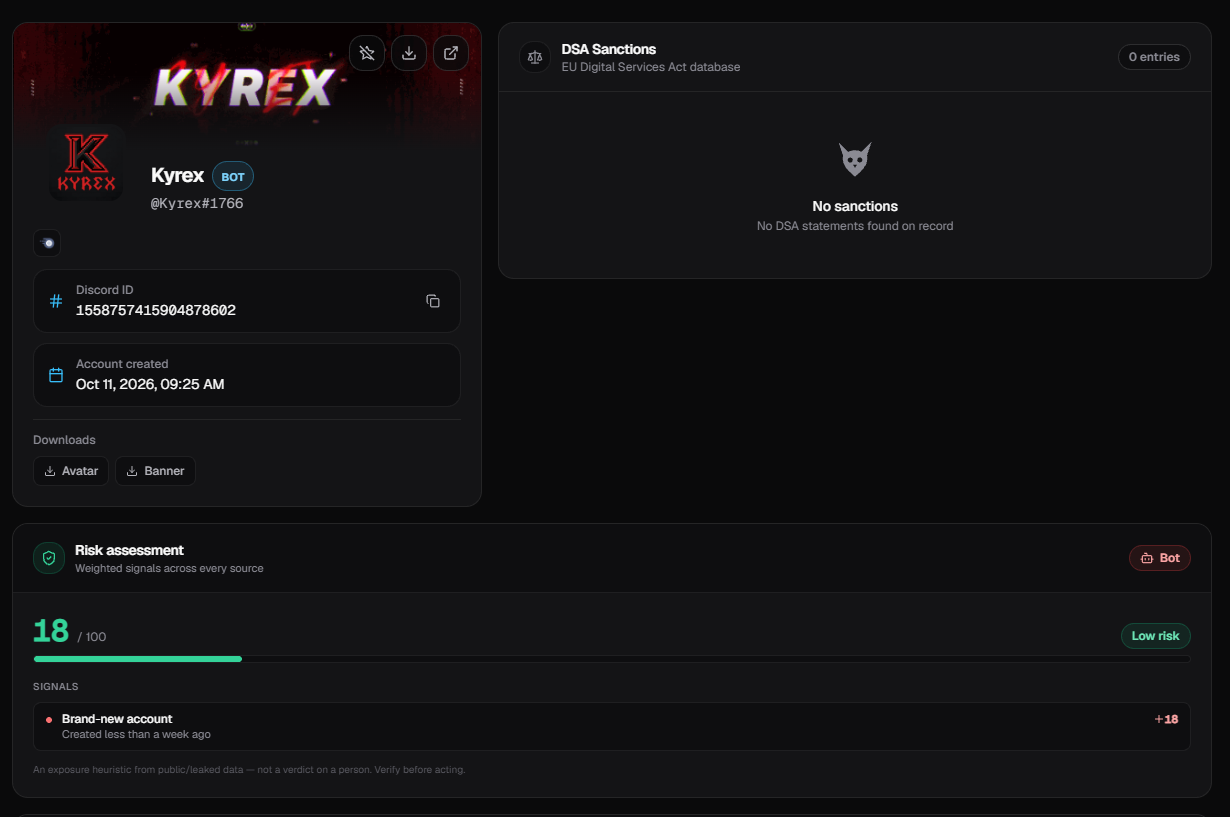
/scan command preview

All Commands

Kyrex uses slash commands only โ€” type / in any server.

๐Ÿ›ก๏ธ Moderation
๐Ÿ‘ข /kick

Kicks a member from the server. Respects role hierarchy โ€” you can't kick someone with a role equal to or above yours.

Kick Members
๐Ÿ”จ /ban

Permanently bans a member. Their messages stay unless you use delete_message_days. Also respects role hierarchy.

Ban Members
โœ… /unban

Unbans a user by their Discord ID. Works even if they aren't in the server โ€” just paste their ID.

Ban Members
๐Ÿ”‡ /timeout

Times out (mutes) a member for a chosen duration, from 1 minute up to 28 days. They can't send messages, react, or join voice.

Moderate Members
๐Ÿงน /clear

Bulk-deletes recent messages in the current channel. Choose any amount from 1 to 100. Perfect for cleaning up spam raids.

Manage Messages
โš ๏ธ Warning System
๐Ÿ“Œ /warn

Adds a warning to a member with a required reason (up to 200 characters). Warnings are saved per-server in a database, so each community keeps its own history.

Moderate Members
๐Ÿ“‹ /warnings

Shows up to the latest 10 warnings for a member, plus the total count. Each entry shows the moderator, reason, and date.

Moderate Members
๐Ÿงฝ /clearwarnings

Removes every warning from a member at once. Useful when someone has cleaned up their act and you want a fresh start.

Moderate Members
๐Ÿ“ข Announcements & Rules
๐Ÿ“ฃ /announce

Posts a professional announcement embed.

Classic mode: fill in title, message, optional ping (@everyone/@here), and an image URL.

JSON mode: paste a full Discord JSON payload into json_data for total control over the embed.

Administrator
๐Ÿ“œ /postrules

Posts a ready-made server rules embed in any channel you pick. Comes with 10 standard rules + punishment ladder already written for you.

Administrator
๐Ÿ”Ž OSINT Scan
๐Ÿ•ต๏ธ /scan

Full OSINT lookup on any Discord user ID via CordCat. Returns multiple embeds covering: profile & badges, risk assessment with signals, bot detection, breach records with every field, IP geolocation (ASN + org + country), FiveM records, EU DSA statements, exploit scans, and cache metadata.

Moderate Members
โš™๏ธ Setup
๐Ÿ“‹ /setlogs

Choose the channel where every moderation action is logged โ€” kicks, bans, timeouts, warnings, clears, and announcements.

Manage Server
๐Ÿ‘‹ /setwelcome

Choose the channel for welcome and goodbye messages. New members get a green embed with their avatar and account age.

Manage Server
๐Ÿ“ข /setannounce

Choose the default channel for /announce posts. You can still override it per command.

Manage Server
๐Ÿ—‘๏ธ /removechannel

Turns off one of the channel settings (logs / welcome / announcements) without changing anything else.

Manage Server
๐Ÿ” /settings

Shows all channel settings currently configured for this server in one clean embed. Ephemeral โ€” only you see it.

Manage Server
โ“ /help

Shows every command Kyrex supports, grouped by category. Available to anyone โ€” no permissions required.

Everyone

Quick Setup

Get Kyrex running in under 2 minutes.

1

Invite Kyrex

Click Add to Discord above and pick your server.

2

Pick your channels

Run /setlogs, /setwelcome, and /setannounce and choose channels for each.

3

Move the role up

In Server Settings โ†’ Roles, drag Kyrex's role above the members it should moderate.

4

Done! ๐ŸŽ‰

Type /help in any channel to see every command.

Permissions Kyrex Needs

Kyrex only asks for what it uses.

๐Ÿ‘ข Kick Members

For /kick.

๐Ÿ”จ Ban Members

For /ban and /unban.

๐Ÿ”‡ Moderate Members

For /timeout, /warn, and /scan.

๐Ÿงน Manage Messages

For /clear.

๐Ÿ“ข Send Messages + Embed Links

For every command that posts an embed.

๐Ÿ› ๏ธ Manage Server

For the setup commands like /setlogs.